
You need to apply Regional Settings under Windows NT4 / 2000 / Terminal Server in a particular way. If you don't you may end up with the incorrect date and currency display, units of measurement.
Windows NT
Control Panel ¦ Regional Settings
One the first page you will see (at the bottom of the form) a checkbox marked 'Set as system default locale' . Check this and click "Apply". You will be prompted for your NT CD, and after various files are copied, you will be asked to reboot the server.
Windows 2000
Control Panel ¦ Regional Options
At bottom of form click the Set Default button
When a new form is displayed select your Language & Country from the the Locale options.
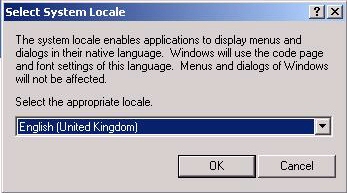
You may be prompted for your Windows 2000 CD, and after various files are copied, you will be asked to reboot the computer.
Windows XP
Control Panel ¦ Regional & Language Options
Change page to the Advanced Tab
When a new form is displayed select your Language & Country from the the Language for non_Unicode programs options.
Then tick the Default user account settings
You may be prompted for your Windows XP CD, and after various files are copied, you will be asked to reboot the computer.
You need to be logged in as the Administrator to carry out these tasks
NOTE: once you have made these changes, if RentalDesk NX still does not display correctly, you probably need to close the programme, then locate the file LANGUAGE.TXT in your RentalDesk folder (C:\Program Files\RentalDesk NX) and DELETE it.
Comments
3 comments
I have the issue with the wrong currency being displayed in rentaldesk , altough al systems are set to (belgium(dutch)) as locale with the euro as default currency.
server as well as workstations , when I go to the financial settings it displays the right discription (EUR belgium) en the right iso (EUR) , yet the currencystring is set to BF for some reason.
I'm running rentaldesk on win7 ultimate with the "language for non-unicode programs" set to dutch(belgium) , yet i can't change the default currency in rentaldesk's financial settings , only the second currency can be changed to € when I select belgium from the menu and the pop-up menu informs me about the EMU status of belgium (by default it's BF as well) . I can't find the language.txt file either , yet I run the latest version , what al I missing here ?
Hello
We're having problems with a couple of our users here showing dates in the American Format, (We're in the UK). I've changed all possible settings in windows control panel, and looked unsucessfully for the "Language.txt" file mentioned above. Is there anything else we should be doing?
It is worth noting that Windows can lie about what locale it is using. If things don't appear to be correct in rentaldesk, change the language setting to another region entirely. Reboot and then change to the correct language/region and rentaldesk will pick up the correct setting.
It is a fault in Windows installer that does not completely set the language and regional properties when first installed so they need to be reset to work correctly.
Please sign in to leave a comment.